
Daily Report - Use and useful actions - EN
1. Quarantine report
On a daily basis, a SpamTitan report e-mail is sent to you.
This report is delivered directly to your inbox.
It looks like the image below:
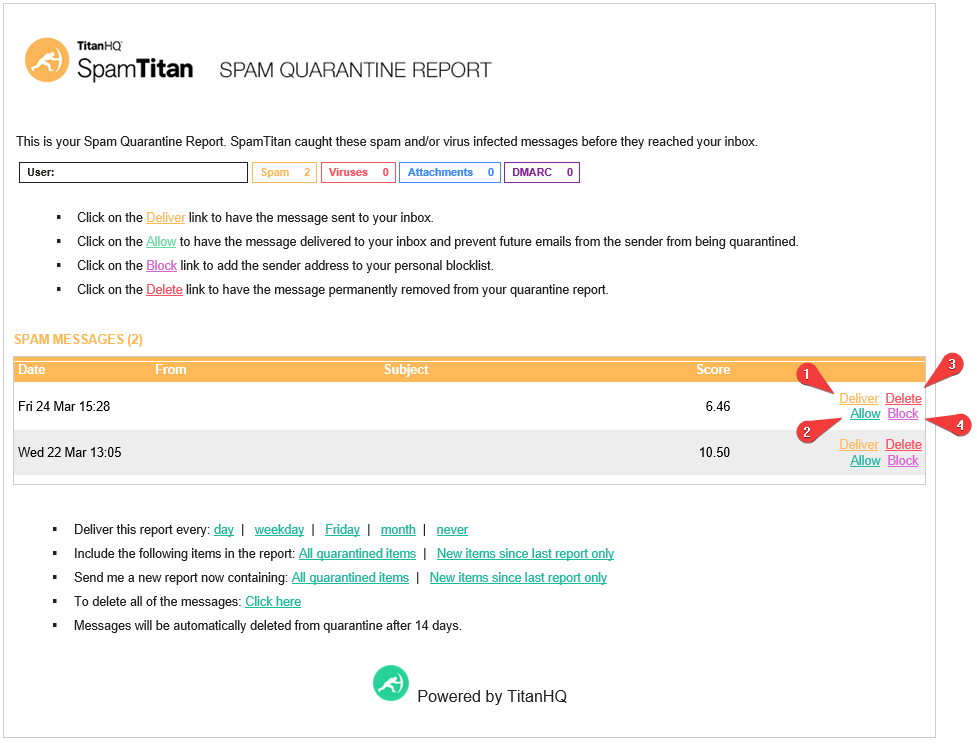
Every e-mail sent to you is processed by our anti-spam software. Some e-mails are classified as SPAM. This depends on the scores assigned to them (the higher the score, the more likely the mail is to be real SPAM).
Although Spamtitan's antispam software may treat some e-mails as SPAM and keep them in quarantine, you can act directly on each of these e-mails to authorize, deliver, delete or block them.
2. Actions on quarantined emails
This corresponds to the 4 numbered buttons above. You'll find a description of the actions performed for each of these buttons below:
1: Deliver : When you click on “Deliver”, the mail will be released from quarantine and delivered back to your inbox.
2: Allow : When you click on “Allow”, the sender of the e-mail will be added to the White list on the anti-spam server side. This means that the sender will be authorized to send you e-mail. Emails from this sender will no longer be treated as SPAM. They will therefore be delivered directly and will no longer appear in your daily report.
3: Delete : When you click on “Delete”, the mail will be completely removed from the quarantine.
4: Block : When you click on “Block”, the sender will be added to the Black List. Anti-spam will then treat the e-mail as SPAM. You will no longer see emails from this sender in your daily quarantine report. They will be blocked directly by antispam.