
Password - Best Practice - EN
How to choose your password
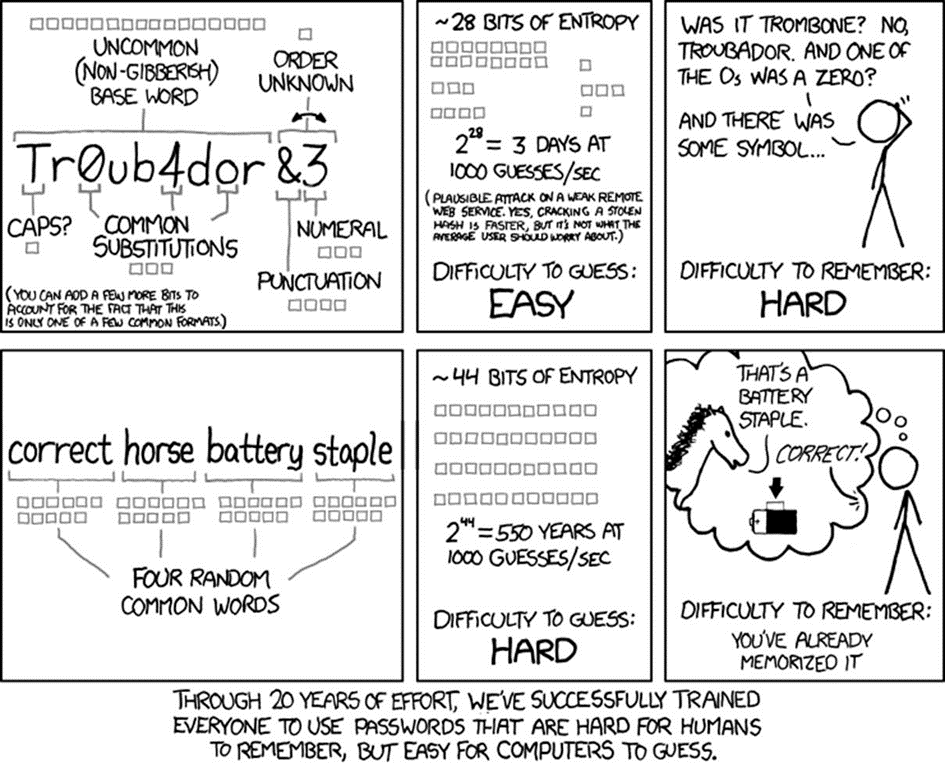
All passwords must be reasonably complex and difficult for unauthorized persons to guess. Employees must choose passwords of at least 12 characters and contain a combination of upper and lower case letters, numbers, punctuation marks and other special characters. These requirements will be implemented using software whenever possible.
In addition to meeting these requirements, employees should also use common sense when choosing passwords. They should avoid basic combinations that are easy to crack. For example, choices like “password”, “password1” and “Pa$$w0rd” are equally bad from a security point of view.
Don't use common acronyms in your password.
Don't use names of people or places as part of your password.
Don't use any part of your last name, first name, company or domain in your password.
Don't use parts of numbers that are easy to remember, such as telephone numbers, social security numbers or addresses.
A password must be unique and meaningful only to the employee who chooses it.
Employees must choose unique passwords for all their accounts, and cannot use a password they already use for a personal account.
If the security of a password is called into question - for example, if it appears that an unauthorized person has used it to access the company's data - the password must be unique.
Password protection
Employees can never share their passwords with anyone in the company, including colleagues, managers, administrative assistants, IT staff, etc. Anyone needing access to a system will be assigned a unique password.
Employees may never share their passwords with third parties, including those claiming to be representatives of a business partner with a legitimate need to access a system.
Employees must take steps to avoid phishing scams and other attempts to hack passwords and other sensitive information.
Employees should refrain from writing down passwords and keeping them on their workstations.
Employees should not use the same password for all IT services (computer, e-mail, websites, etc.).
If employees accessing the same services share certain passwords, the password must be changed as soon as an employee leaves the company.
If someone asks you for your password, report it promptly to KissLabs.
